Apple AirPods Pro (2nd generation) vs Apple AirPods Pro (1st generation)
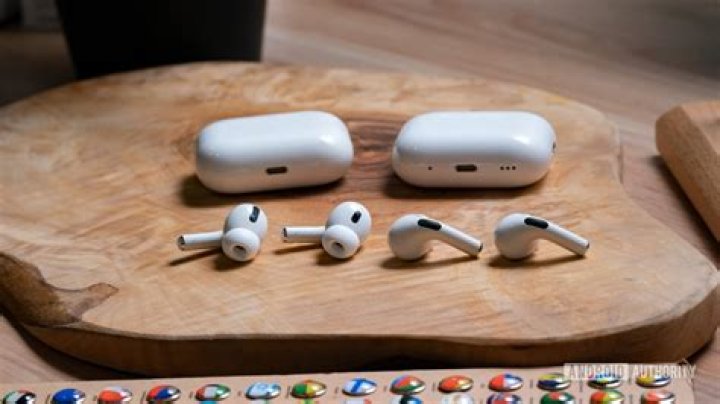
Apple has got a big corner of the headphone market. They bought Beats by Dr. Dre back in 2014, giving them a huge part of the bass-heavy market. And their own Apple brand headphones and earbuds are also massive business thanks to their compatibility with iPhones.
Table of Contents
When the AirPods Pro came out in 2019, we were finally treated to a true wireless experience that included active noise canceling. Just three years later, the 2nd generation of these buds was released. But is it a big improvement?
Well, to find out, I decided to compare Apple AirPods Pro (2nd generation) vs Apple AirPods Pro (1st generation) in a head-to-head battle to see what Apple has done to improve their flagship earbuds.
Apple AirPods Pro 1st Generation
On the dark and stormy night of October 30th, 2019 (well, it was dark and stormy and nighttime somewhere!), Apple first released their AirPods Pro earbuds. These true wireless earbuds were an upgrade from the AirPods (2nd generation) that were released earlier that same year.
But, this time, they included a water resistance rating and active noise cancellation to improve their versatility and user experience. They also retailed at $249, making them the brand’s flagship earbuds. And placing them in the upper-mid-price range of earbuds in general.
Apple AirPods Pro 2nd Generation
Nearly three years later, the AirPods Pro 2nd Generation came out on September 23rd, 2022. While the 1st generation featured Apple’s H1 chip, the 2nd generation sports the updated H2 chip, plus a U1 chip in the charging case.
This generation has improved battery life and different controls. Plus, a lot of other features intended to enhance the user’s experience. Like their predecessor, this version also retails for $249.
Apple AirPods Pro (2nd generation) vs Apple AirPods Pro (1st generation) – In-Depth Comparison
Now that I’ve introduced our two contenders, it’s time to move on to the main event. Will the older model use the wisdom of experience to beat out its younger rival? Or, will the newest addition be just that much better, that it can steal the crown? You’ll find out in my in-depth AirPods Pro 1st Gen vs AirPods Pro 2nd Gen comparison.
Let’s get ready to rumble…
Overall, the 2nd generation is better. But, after three years of advanced design by some of the top people at one of the world’s top companies, it’s surprising how minor most of the changes are.
Yes, there are slight improvements in the sound quality, the ease of using the controls, battery life, and the charging method. However, if you feel like you have to rush out and replace AirPods Pro Gen 1 with AirPods Pro Gen 2, I’d say hang on just a minute.
Instead of racing to upgrade, read about the changes made to the latest version of the Apple AirPods Pro. Then, decide for yourself if it’s going to be worth it.
Battery Life
I think the #1 area that users want Apple to improve in their products is battery life. Now, I could go on and on about the iPhone, but let’s leave that for another day. Instead, let’s see how well Apple is doing on its earbuds.
The AirPods Pro first-generation earbuds…
These boasted five hours of playback when they came out in 2019. Back then, that was considered to be pretty good. In testing, they could last even longer – about five hours and 15 minutes. So, I think Apple just rounded down to make things easy.
The charging case also provided an additional five charges worth of fuel. Meaning that you got six 5-hour charges for a total of 30 hours with the whole unit. This ran to about 6 x 5.25 = 31.5 hours in standard tests at moderate volume.
Of course, this is with the ANC on in either Noise Cancellation or Transparency Modes. With ANC turned off, you’ll get an hour to an hour and a half more. The earbuds charge quickly, giving you three to four hours of playback with a 30-minute charge. Back then, that was fast.
The AirPods Pro second generation earbuds…
Three years later, these buds were expected to wow us. They didn’t. While other brands like Samsung and Sony are pushing battery life to over ten hours of playback, Apple has fallen behind.
They did manage to extend the 2nd generation’s battery life to about 6 hours on a single charge. However, the charging case only holds four more charges’ worth of fuel. This means that you’ve got 6 x 5 = 30 hours of playback altogether on paper.
So, this is equivalent to the total of the 1st generation on paper. In reality, the 1st generation AirPods Pro has a better battery life than 2nd generation AirPods Pro. But, just slightly.
To me, this is still an improvement…
I never use my earbuds for 30 hours straight without finding a place to plug them in. So, running out of juice altogether is less of a concern. I’d rather have the buds last longer on a single charge, so five 6-hour charges are better than six 5-hour ones.
Charging Case
The original AirPods Pro came with a charging/carrying case that was essentially the same size as the one for their regular AirPods. It was a durable little case, measuring just 1.8” x 2.4” x 0.9”, that you could easily slip into any pocket.
In 2021, Apple changed their bundling to package the AirPods Pro 1st generation with a Magsafe charger. It allows you to charge the case (and the buds if they are inside) wirelessly by just placing the case on it. Also, the case can be charged with an Apple Watch charger. The case is also IPX4 water-resistant. Meaning that while it can’t be submerged, it can withstand splashes of water or the occasional spill.
The case for the AirPods Pro 2nd generation has some minor upgrades…
It’s still IPX4 water resistant (as are the earbuds themselves) and can be charged with the Magsafe charger (or the regular old lightning cable, if you prefer). The case is almost the same size, but it is a tiny bit heavier.
What’s new is that the case has a U1 chip inside and a tiny speaker built in. Both of these features help you locate the case when it’s misplaced. Therefore, you don’t have to rip your place apart looking for it. You can use the Find My feature in iOS to locate the case, and the speaker will ring to help you find it once activated. That’s a pretty great new feature!
Other than that, there’s a new lanyard loop built in, so you can put the case on a keychain or a clip. Wow.
Sound Quality
If you’re going to improve anything on a pair of earbuds, then it has to be the sound quality. That is, unless they’re already the cream of the crop. And let’s face it, Apple’s AirPods Pro is not. But, they’re also not $500.
These true wireless earbuds are designed to be a mid-range priced product for regular folks, not the highly discerning audiophile. Even so, for about 250 bucks, you expect your headphones to sound pretty darned good.
The sound on the 1st generation AirPods Pro didn’t blow anyone away…
They have a somewhat natural frequency response curve. That means you hear what the incoming audio gives you. Sort of. They do have a dip in the low and mid bass but a slight boost in the high. This gives an overall lower-than-natural bass level. So, if you were looking for big, slapping bass, this isn’t the earbud for you.
Likewise, the high-end is toned down as well. But, in this case, it’s mostly positive. That’s because it takes away some of the harshness you might get from sharp speech sounds or high-pitched instruments. The mid-range is solid and fairly accurate.
Unsurprisingly, the general sound profile of the 2nd generation AirPods Pro is very similar to the 1st generation.
But they have a few tricks up their sleeve…
Both earbuds have Adaptive EQ. This is a feature that helps to adapt the sound mix to the shape of your ear canals and the fit/seal of your buds. This is always turned on for the 1st generation, but you can turn it off on the newer earbuds. And it makes a difference.
When you turn it on, you’ll get a warmer, thicker sound with more bass and a better tone to instruments and vocals. And, naturally, it’s improved in the 2nd generation.
The H2 chip in the 2nd Gen also adjusts the EQ based on the volume you’re listening at. This is because the same mix listened to at different volumes will sound different. These earbuds attempt to compensate, so the mix sounds the same at all volume levels.
For both models…
You can tweak the EQ yourself by using iOS controls. There’s not a lot of variability, but you can use “Accessibility” to get some control over your sound. This is especially useful when listening to speech (like news or podcasts). That’s because you can boost the mid and high end to make voices easier to comprehend.
Finally, both generations of the AirPods Pro include a feature called Spatial Audio. This feature provides a virtual stereo soundstage by dividing up incoming audio signals to produce directional sounds. In other words, it makes your single-driver earbuds sound more like a surround sound system.
But in the 1st generation, it’s pretty lousy…
The Spatial Audio function can be turned on through Bluetooth settings for iOs and iPadOs users. But you need to be using version 14 or later. And it only works with supported apps like Apple TV, Netflix, Disney+, and HBOMax.
It also uses head tracking, which adjusts sounds to the position of your head. With the first generation, this didn’t work all that well. The Spatial Audio sounds only mildly better than your regular listening mode. And, since it uses more battery power, it was hardly worth singing.
With the 2nd generation, Spatial Audio with head tracking works a lot better. It gives you a more immersive experience, and it does start to feel like sounds are coming from different directions. This isn’t as immersive and sensitive as the Spatial Audio found in gaming consoles, but it’s a good start.
ANC
The whole reason for choosing these earbuds over the regular AirPods is their active noise cancellation. In general, it works very well on both generation models. However, when Apple made some changes to the 2nd-gen buds, they didn’t make a perfect improvement.
The 1st generation buds can reduce outside sounds by up to 21 dB, which is quite good. The 2nd generation buds can block out nearly 23.5 dB. That might not sound like a big difference. But keep in mind that a 3 dB change sounds about twice as loud. So, the AirPods Pro Gen 2 ANC is better than the AirPods Pro Gen 1.
But it isn’t just that simple…
The big change is in the greater reduction of low bass noises like airplane engines or bus motors. However, the 1st generation did better with high-end sounds like annoying humming and things like dog barks and shouting.
Still, the change in bass noise blocking is huge, and the treble is only slightly different. So, in general, the 2nd generation AirPods Pro really does a much better job with ANC.
Controls
One thing that I feel Apple has done a good job with is changing the controls for the 2nd generation AirPods Pro. With the 1st generation, they moved from a tap sensor to a force sensor. That means you have to squeeze the stem to control your play/pause, or take calls. While this works well enough, there’s a better way to do it.
The 2nd generation AirPods Pro has a touch control on the stem that feels like you’re using a touchscreen. It’s a lot more intuitive to use, and I think it also responds better. And the best part is the volume control.
Yes, you read that right…
Apple has finally included a volume control right on the earbuds. With the 1st generation, you had to race to grab your device or pop your earbuds out if the volume suddenly leaped up, like in an explosive song or movie.
Now, they’ve made it way easier with a touch slider on the stem you can turn the volume up and down with. You could use Siri to change the volume remotely with the AirPods Pro 1st generation, but that’s nearly as convenient. Speaking of Siri, both versions of these earbuds have Siri always on, so you can access your assistant by just saying, “Hey, Siri.” Unfortunately, assistants don’t work on Android devices.
The feedback for the controls of the 1st generation buds isn’t great. You do get sounds when you squeeze the stems, but they’re not as good as the touch sensor on the 2nd-gen buds. Here you get clicks for touches/taps, chimes for scrolling through tracks, and when you slide the volume goes up and down.
Connectivity
Here’s another area where the upgrade to the 2nd generation AirPods Pro isn’t a clear-cut improvement. The 1st generation supports Bluetooth version 5.0, while the newer Generation 2 model supports the latest and greatest version 5.3. This cutting-edge tech allows them to have a much longer range than the originals.
While the 1st generation had a line-of-sight range of 171 feet (51m), the 2nd generation can receive a signal up to 334 feet (102M) away. Of course, this is going to be much lower around corners and through walls. But that’s nearly double the range, which is a massive improvement.
But there is always a downside…
On the flip side, the 2nd generation AirPods Pro actually has higher latency. This is true across all devices. Naturally, they’re most effective with iOs devices, while Android works well and PC has very poor performance. The same pattern is true for the 1st generation, but they have better scores across the board.
Gen 1 AirPods Pro’s latency with iOS devices is only 49ms, while the Gen 2s scored 83ms. While this is way slower, you’re unlikely to notice any lag in your audio from an iOs device. On PC, however, both generations perform very poorly, making them all but ineffective as gaming earbuds.
Design and Comfort
In terms of design, there is not much difference between 2nd generation AirPods Pro and 1st generation AirPods Pro. The shape, size, and fit are nearly identical. But, the extra battery power has increased the weight somewhat.
The 1st Gen earbuds weighed only 0.16 ounces, while the new generation weighs 0.19 ounces each. While that’s an 18% increase, it’s doubtful that this will lead to any sort of noticeable discomfort even after an all-day listening session. Other than that, Apple boasts the inclusion of a new ear tip size.
How exciting!
Instead of coming with just three sizes of silicone ear tips (S, M, L), the 2nd generation now provides you with extra-small tips as well. Yes, this will be convenient for users with smaller ears, but it’s hardly worth writing home about.
Many users find that the 1-size-fits-all design of the AirPods Pro doesn’t fit all. And that they can slowly work their way out of your ears, especially during exercise. Pro Tip – changing to foam tips can really help with a secure fit and will cost you next to nothing.
Apple AirPods Pro (2nd generation) vs Apple AirPods Pro (1st generation) – Quick Run-Down
| AirPods Pro Gen1 | AirPods Pro Gen2 |
|---|---|
| Shorter battery power; more charges | Longer battery power; fewer charges |
| Regular case | Case with speaker and U1 chip |
| -21 dB of ANC | -23.5 dB of ANC |
| Poor spatial audio | Decent spatial audio |
| Shorter Bluetooth range; less latency | Longer Bluetooth range; more latency |
| S, M, and L ear tips | XS, S, M, and L ear tips |
Have More Questions About Different Apple Earbud Models?
If so, take a look at our comprehensive comparisons of Apple AirPods Pro (2nd Generation) vs Beats Fit Pro, Apple AirPods (2nd generation) vs Apple AirPods (3rd generation), AirPods Pro vs Beats Powerbeats Pro, Apple AirPods Pro vs Sony WF-1000XM4, and Samsung Galaxy Buds vs. Apple AirPods for more information and advice.
Apple AirPods Pro (2nd generation) vs Apple AirPods Pro (1st generation) – The Verdict
In the end, Apple has made some improvements to the AirPods Pro between the 1st generation and the 2nd generation. They better have – why else bother?
But are these changes enough to make people ditch their 1st generation buds in favor of the newest model?
The new model has somewhat improved sound, a better range, and better ANC. And the buds last longer on a single charge even though the total amount of charge you can carry, case included, is about the same.
On the whole, the Gen 2 AirPods Pro is better than the Gen 1 AirPods Pro. But, if it was me, I wouldn’t be racing out to drop 250 bucks on a new model that’s not much different from the old one. That said, if you’re going to buy new buds, get the 2nd generation, hands down.
Until next time, happy listening.